Legacy Modal Remediation
Mini Case Study
The challenge
As part of a comprehensive accessibility audit effort, which included manual testing, I discovered that an existing application contained a critical navigation blocker: an informational modal built with legacy code that lacked semantic structure. The modal completely lacked focus and screen readers couldn't differentiate the modal from the background content.
The process
I performed a dual-layered audit of the component against WCAG 2.2 Level AA standards. While automated scanners returned a "Pass," manual keyboard and screen reader analyses revealed a critical navigation blocker. Because the legacy codebase didn't support the HTML5 <dialog> element, I had to implement custom solutions to meet these user needs:- The keyboard user: needs both a focus trap and escape mechanism
- The screen reader user: needs to know the modal is a distinct, active dialog
- The business: needs a solution that works with legacy constraints to avoid a full framework refactor
The approach
I translated these accessibility needs into actionable requirements suitable for a Jira ticket.
The solution
I manually wired the modal with the following technical logic:
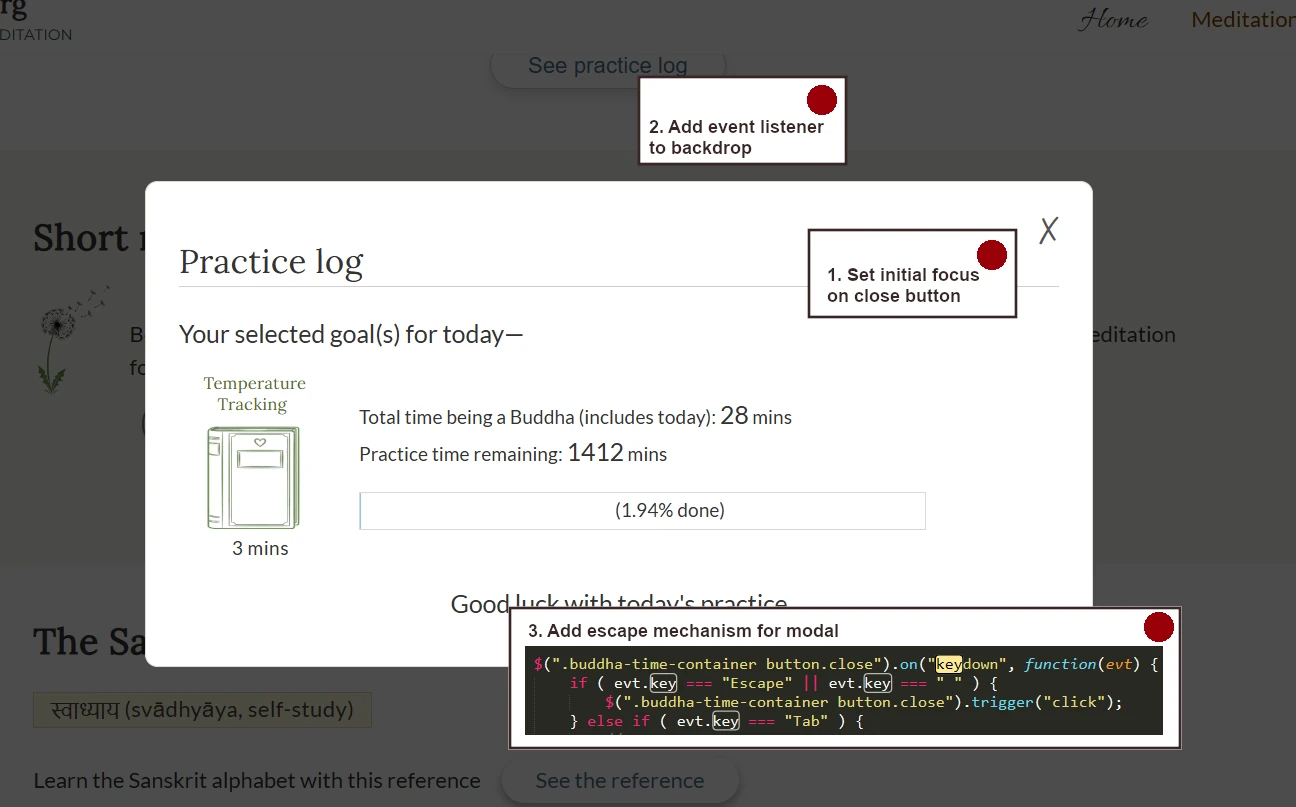
- Focus management: placed initial focus on the "Close" button
- Event listeners:
- Added a keydown listener for proper tabbing
- Added click listeners (spacebar and escape) for expected closing behavior
- Added click listeners for backdrop closing behavior
- ARIA attributes:
- Button: aria-controls="[the modal ID]", aria-haspopup="dialog"
- Modal: role="dialog", modal="true", toggle for aria-hidden="true"
- Non-modal items when modal opens: inert attribute set
The result
A fully compliant, manually-wired modal that passes all keyboard and screen reader audits. By embedding these requirements into the Jira backlog, I demonstrated how accessibility can be integrated into the "definition of done" for legacy environments.
The takeaway
Automation is a baseline, not a ceiling. 100% of the remediation for this modal was driven by manual keyboard testing, proving that human-centered audits are the only way to ensure true WCAG compliance.
Going forward
- Propose moving these manual fixes into a reusable "Accessible UI Pattern Library."
© 2025, Carol Robertson